An auditor wants your org chart by Friday. Or a customer's security team does, or an employee needs one for a visa file, and someone in the meeting says it can't be sent because it's confidential. Is an org chart confidential? Mostly no, and in places yes. Who reports to whom is rarely a secret worth keeping. What you attach to each name can be. So the practical question is which version of the chart goes to which reader.
We make org chart software (OrgPlease!), so treat us as biased. Nothing here is legal advice. Your contracts, your regulator and your lawyer outrank a blog post.
Is an org chart confidential? It depends on the layer
For a private company, we looked for a rule and didn't find one. Canadian federal and Québec private-sector privacy law, the GDPR, and the SOC 2 and ISO 9001 guidance we read don't label an org chart confidential or public. Governments are the exception, and their rules mostly run toward publishing. Québec's departments and agencies must post their organization chart on a website, and English councils must publish one covering their top three levels of staff.
A company's chart is as sensitive as what it carries, and it can carry four different things:
| Layer | What is in it | Who usually sees it |
|---|---|---|
| Structure | Boxes, job titles, reporting lines, headcount | Almost anyone with a reason to ask |
| Names and work contacts | Name, work email, work phone, location | Staff, and outsiders who need to reach someone |
| Employment details | Employee number, grade, hire date, photo | Staff who need them to do their job |
| Private details | Salary, performance reviews, security clearance, leave, home address | HR, and never through a chart |
Two charts are confidential whatever layer they stop at: a draft of a structure you haven't announced, and any version that shows who is leaving before they've been told.
What privacy law says about names and titles
The two Canadian laws we checked go lighter on the top two layers. Europe makes no such allowance.
- Canada's federal law, PIPEDA, defines business contact information as information used to communicate with a person about their work, such as their name, title, work address, work phone and work email. Part 1 of the Act, the part with the privacy rules, doesn't apply when an organization handles it solely for that purpose. (For employee information, PIPEDA covers federally regulated employers.)
- Québec's private-sector law switches off two of its divisions, the ones on collecting personal information and on keeping it confidential, for information about the job a person holds in a business: their name, title and duties, and the address, email and phone number of their workplace. The rest of the Act still applies. We cover the Québec side in Law 25 and your org chart.
- The European Union has no equivalent exception. The European Commission's own examples of personal data include an email address in the form name.surname@company.com.
Names and titles are still personal information under all three. So is everything below the second layer, with no exception anywhere. A chart that shows salary or clearance level is an HR record with lines drawn on it.
Why a harmless chart interests an attacker
MITRE's ATT&CK catalogue of attacker techniques has an entry for this, called Identify Roles: learning who holds which job in a target organization before an attack. The FBI's page on business email compromise shows what that knowledge is for. One of its examples is an email that appears to come from a CEO, asking her assistant to buy gift cards. To write that email you need two names and the line between them, and an org chart is a page of exactly those.
MITRE's advice is modest. Research of this kind can't easily be prevented, so the effort goes into limiting how much information outsiders can reach and how sensitive it is. For a chart, that means the outside version has no email addresses and no phone numbers, and you think twice before publishing who approves payments and who assists them.
Who asks for an org chart, and what they need
Most outside requests want proof of structure. Few of them need every name.
Auditors. One of the SOC 2 criteria, CC1.3, asks whether management has established structures and reporting lines. One audit firm lists an organization chart among its sample controls for that group of criteria, and the criterion itself doesn't name one. ISO says much the same about ISO 9001. Its guidance on documented information lists organization charts among documents that can add value and notes that the standard doesn't require them.
Food-safety and quality auditors. In a 2015 forum thread on this exact question, people who prepare for food-safety audits describe what passes: directors and department heads by name, everyone else as a job title with a headcount. One has a chart with no names on it at all and reports that every auditor accepted it. Another received a minor finding for an inaccurate chart, after the named deputies had changed. A third had an auditor who always asked who the quality system manager and their deputy were, so those two are worth naming.
Immigration and skills assessors. VETASSESS, an Australian skills assessment body, requires an organisational chart for a list of mostly managerial occupations. It should be on company letterhead and show the applicant's position, those of their superiors and subordinates, and the other positions that report to the applicant's supervisor. That is the applicant's corner of the company, peers included.
Customers and investors. They want to know who is accountable for what: the leadership team, and whoever owns the function they care about, such as security or finance. Names and titles at the top are enough.
Three versions from one roster
One list of people can be shown three ways.
- The HR version shows every field and stays with HR.
- The staff version shows name, title, department, location and work contacts. Everyone in the company can see it.
- The outside version shows the structure and the titles, with names for the leadership team and no contact details. It is the only one that leaves the building.
Keeping three separate files is how the versions drift apart. Keep one list and hide columns.
How to send a chart to someone outside the company
- Ask what the chart has to prove. An auditor wants reporting lines and responsibilities. An assessor wants one person's position. Neither asked for your payroll.
- Send the smallest chart that proves it. One branch is often enough.
- Use names where they were asked for, and titles with headcounts everywhere else.
- Label it and date it. A footer that says Confidential and a date tells the reader how to treat the file and how old it is.
- Prefer a link that expires over an attachment that sits in an inbox for ten years. When the reader has to keep a file for the record, as auditors do, send a PDF and note what you sent.
How OrgPlease! handles this, and where it stops
Our product covers part of this.
A preset is a saved choice of which fields appear on the cards, with a switch for each field. New accounts start with three: Default, HR and Public. Out of the box, Public shows the name, the title and two more fields, and hides the rest, email and salary included.
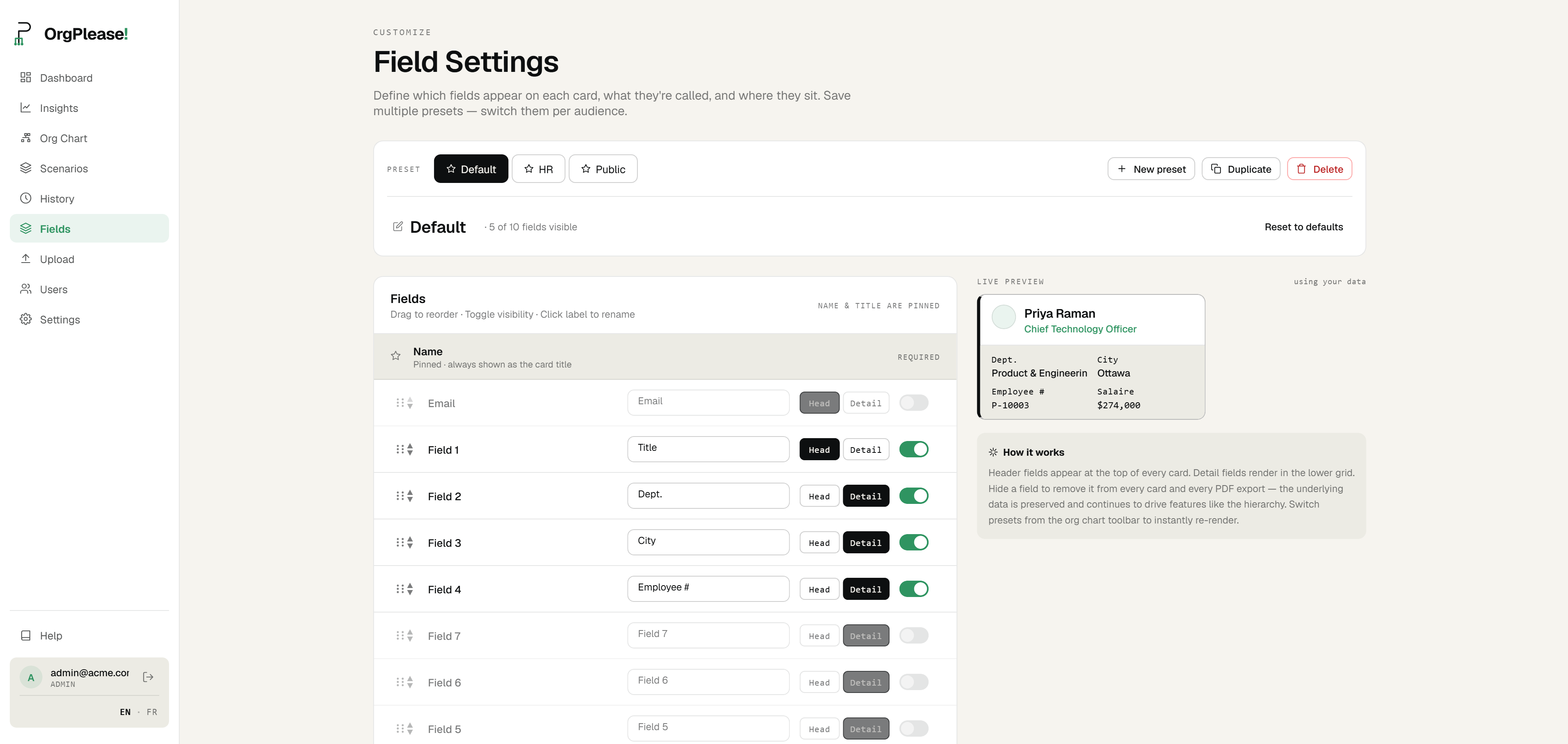
Share creates a read-only link to the chart as the current preset shows it. The values of fields the preset hides are stripped on our server before the page is sent, so they aren't sitting in the page source. Email addresses are never included in a shared chart, even when the preset shows them. The link stops working after 30 days.
On Starter and above, a confidentiality label prints in the footer of every PDF page, with Confidential, Internal Use Only, Restricted and Draft as one-click choices. To send one branch, open Focus mode on that manager and export the current view as a PDF. For a big chart, the PDF splits across pages by manager.
The limits:
- Presets control what is displayed and do nothing about who is allowed to see it. Anyone who signs in to your account, viewers included, can switch presets and see every field you uploaded. If a column must stay with HR, don't upload it to a chart that other people sign in to.
- Every card shows the person's name. A version with titles and headcounts in place of names means uploading a second list.
- A share link carries the whole chart, even when you made it while focused on one branch. To send one branch, send the PDF.
- The app has no button to cancel a share link early. A link ends after its 30 days, so don't put anything behind one that couldn't stay public for a month.
- There are two roles, admin and viewer, and no per-department access. Sign-ins are capped by plan (one on Free, three on Starter, ten on Team), so the staff version usually goes out as a link or a PDF.
- The free plan covers 25 people. The confidentiality label starts at Starter, which is $19 a month.
A default for when nobody has decided
When someone says the org chart is confidential, ask which layer they mean. If nobody has decided, send the outside version, and add a field only when someone gives you a reason to.
Need a version you can send? Upload your roster, switch to the Public preset and share a read-only link that leaves out email addresses and every field you hid. Free up to 25 people. Start your free org chart
Related reading: Lire cet article en français · Law 25 and your org chart · Org chart too big for one page · How to plan a reorg without breaking the org you have